How to Check DNS Records and Actually Trust the Results
Learn how to check DNS records the right way, separate authoritative answers from cached ones, and confirm A, AAAA, MX, TXT, and CNAME values across resolvers.
A DNS change can look finished in the provider dashboard while customers still land on the old server. One checker shows the new address, another shows the previous one, and the incident channel fills with guesses about propagation. The useful question isn't whether DNS has updated everywhere. It's which server answered, what it returned, and whether that answer came from the authoritative zone or a cache.
A reliable DNS check compares those views instead of trusting a single lookup. With dig or nslookup, you can inspect the record, response status, and TTL, then query authoritative nameservers and independent recursive resolvers to see where answers diverge.
Why a Single DNS Lookup Rarely Tells the Whole Story
Rolling back a DNS edit because one customer still reaches the old server can prolong a migration incident. Before changing the zone again, establish whether that customer received an outdated cached answer or whether the published record is wrong. Those situations need different responses.
The authoritative nameserver publishes the zone's current records. A recursive resolver, often run by an ISP or public DNS service, can answer from a previously cached response. A successful lookup against either server proves only what that server returned. It does not establish that customers using other resolvers receive the same answer.
TTL, or time to live, limits how long a record can remain cached, expressed in seconds. The IETF DNS terminology defines this cache lifetime and explains that a TTL of zero prevents caching. On repeated recursive lookups, a decreasing TTL usually indicates a cached answer approaching expiry. Lowering the authoritative TTL after an edit does not shorten the lifetime of copies already cached elsewhere.
Record the answer and its TTL together.
Use dig @<authoritative-nameserver> <hostname> A to check the published address, then run the equivalent query against the affected recursive resolver. Replace the placeholders with the actual server and hostname. If the authoritative answer is correct while the recursive answer is old and its TTL decreases, cache expiry may resolve the mismatch. Check the affected machine's local resolver too, because a public checker may follow a different DNS path.
An error requires a separate diagnosis. NXDOMAIN means the queried name does not exist in the responding server's view; SERVFAIL means the resolver could not complete the query successfully. Neither should be treated as an old address waiting to expire.
For an email-related change, compare authoritative and recursive MX and TXT answers for the names the mail system uses. Confirm that routing and authentication records are published as intended before changing sender settings. The Social Search's deliverability playbook covers the sender-authentication side of that work.
The DNS Record Types You Will Actually Query
Start with the operational question, then choose the matching record type. A website migration usually calls for checking address records; a mail setup calls for MX and TXT records. Asking for the wrong type can make a working name look like it has no DNS answer.
| Record | Purpose | When to verify |
|---|---|---|
| A | Maps a hostname to an IPv4 address. | After changing a website or service endpoint. |
| AAAA | Maps a hostname to an IPv6 address. | When checking IPv6 reachability or a dual-stack migration. |
| MX | Lists mail servers for a domain, with preference values. | When inbound mail is being routed or mail delivery fails. |
| TXT | Publishes text data, commonly used for SPF, DKIM, and domain verification. | When configuring email authentication or proving domain ownership. |
| CNAME | Makes one hostname an alias of another hostname. | When a service provider gives you a target hostname to configure. |
| NS | Identifies the authoritative nameservers for a zone. | When checking delegation or investigating a nameserver change. |
| SOA | Describes zone authority and includes operational fields such as a serial and timing values. | When investigating zone behavior or negative caching. |
An A answer and an AAAA answer aren't interchangeable. A client may use IPv6 when an AAAA record exists, so checking only A can miss a problem that affects IPv6 users. Likewise, an MX lookup checks mail routing, not the domain's web address. For an email setup, inspect the relevant TXT records as well as MX. SPF, DKIM, and DMARC solve different parts of email authentication, and SPF, DKIM and DMARC explained is useful background for understanding why those TXT entries matter.
CNAME checks have a common trap: query the owner name whose alias you're configuring, not just the target it points to. If a provider asks you to create an alias for www.example.com, checking only the provider's target hostname doesn't confirm that your own record is correct.
NS and SOA records help investigate structure and behavior rather than a website's destination. If an A record looks wrong, first establish which nameservers are authoritative for the domain. The SOA can also help explain why a resolver continues returning a cached negative answer after a name has been added.
Running Your First DNS Lookup with dig and nslookup
Start with dig, which is available on many Unix-like systems and makes the response details easy to inspect. Replace example.com with the domain you're diagnosing. The examples below use the reserved documentation domain as a command pattern, not as a claim about a live production configuration.

Run a basic address lookup:
dig example.com AThe response includes a status, flags, and separate sections. NOERROR means the DNS request completed without an error, but you still need to inspect the answer section to see whether the requested record is present. NXDOMAIN means the queried name doesn't exist according to the responding server. SERVFAIL means the server couldn't complete resolution; it doesn't mean the name is absent. The AA flag indicates an authoritative answer. Without it, the response may have come from a recursive resolver.
For a concise answer, add +noall +answer. Try these record-specific queries:
dig example.com A +noall +answer
dig example.com MX +short
dig example.com TXT
dig example.com CNAME
The answer section lists the record data and TTL. Treat that TTL as a current observation from the resolver you queried, not a fixed prediction of when all users will see a change. A full response also has an authority section, which can provide useful information when the requested answer is missing, and an additional section that may contain related data.
Practical rule: Save the full response before stripping it down. The short form is convenient for routine checks, but the flags and authority information often matter during an incident.
On Windows, nslookup provides a straightforward alternative:
nslookup -type=A example.com
nslookup -type=MX example.com
nslookup -type=TXT example.com
The output shows the DNS server that answered and the returned data. That's useful for a quick check, but dig generally exposes more of the response structure in one place. A browser-based DNS lookup can help when you don't have a terminal handy. SiteAlive's DNS Lookup and DNS propagation tools are examples of browser-accessible checks, but treat their output as one resolver view rather than definitive proof that every user sees the same answer.
For a visual walkthrough of the lookup process, see the video below.
Authoritative Answers Versus Cached Resolver Responses
You've changed a record, but an affected client still reaches the old address. Check what the authoritative servers publish, then compare it with the resolver serving that client. A recursive lookup shows that resolver's current view; a direct authoritative query shows what the queried nameserver publishes now.
First identify the domain's delegation:
dig +trace example.comThen query an authoritative nameserver directly. Replace the example nameserver with one returned by the delegation check:
dig @ns1.example-dns.com example.com A +noall +answer +authorityRepeat for the relevant record types and authoritative servers. This filtered command shows record data, but hides the header. Remove the output filters when checking the response code and AA flag, which identifies an authoritative answer. Compare records within the same RRset, using the definitions in IETF DNS terminology, and requery the authoritative source if their TTLs differ.
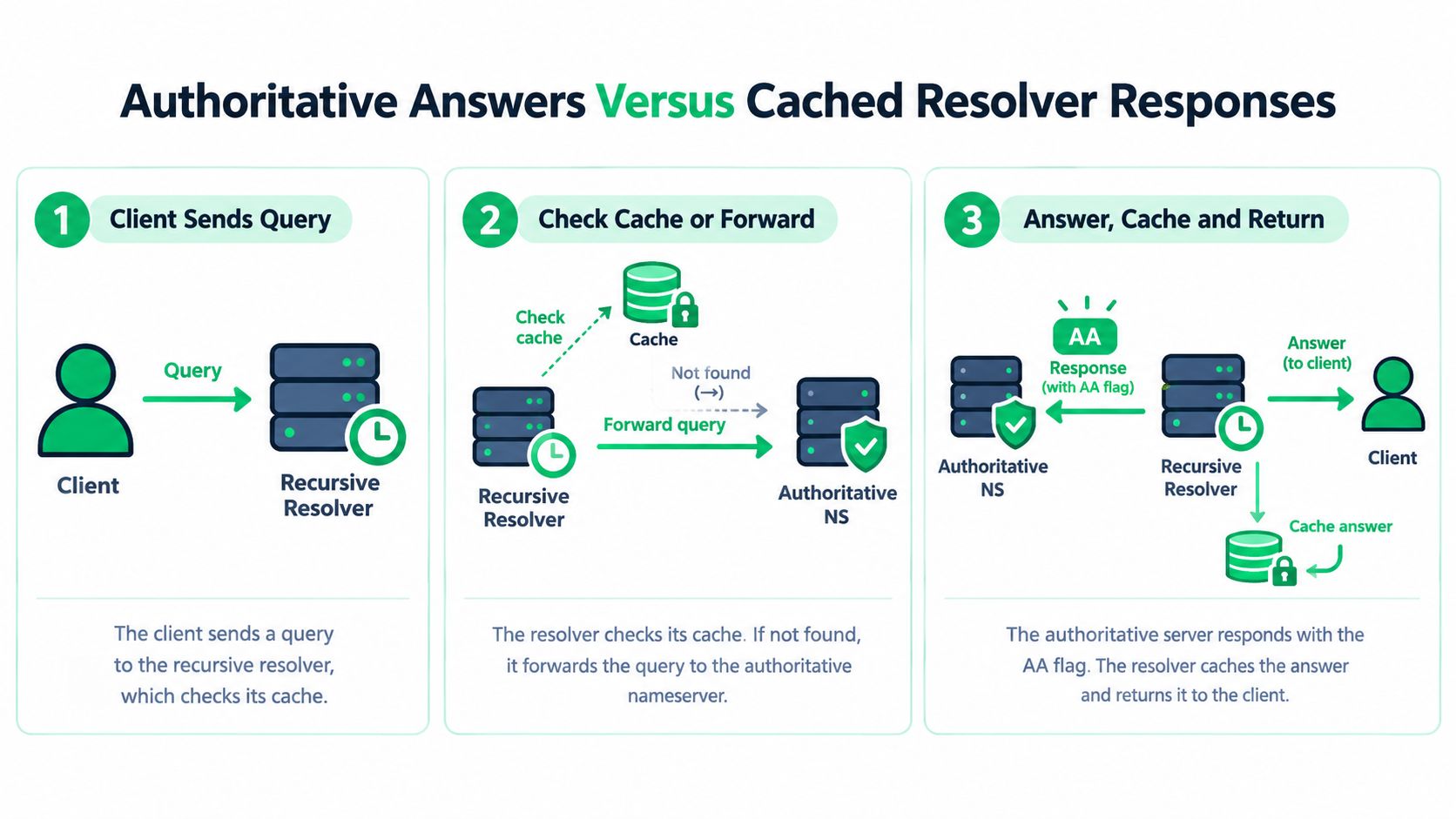
Compare those results with recursive resolvers such as Google, Cloudflare, Quad9, and the ISP resolver used in the affected region. Label each observation authoritative, recursive, or local, with local meaning the affected machine's configured DNS path.
Watch the TTL across repeated queries.
An older recursive answer with a lower, decreasing TTL is consistent with an aging cache. If authoritative servers agree on the intended record, cache expiry is a reasonable explanation, though clients using the old destination can still experience an outage. If authoritative servers disagree, investigate zone publication. If they all publish the wrong value, fix the zone configuration or delegation rather than waiting.
Keep response codes separate from record differences: NXDOMAIN reports a nonexistent name; SERVFAIL reports a failed lookup. Neither is an outdated address.
Infrastructure changes also depend on cached parent-zone delegation. Operators need to account for both child-zone and parent-zone TTLs when changing DNS infrastructure (RFC 9199 on DNS operations). Record the resolver IP, UTC timestamp, response code, answer, TTL, and authoritative server for each observation so the team can compare results and repeat the checks.
Reading DNSSEC, SERVFAIL, and Negative Cache Signals
A record can exist in the zone and still fail for clients whose resolvers validate DNSSEC. Treat DNSSEC as a separate diagnostic branch when one resolver returns an answer but another returns SERVFAIL, especially after a key or delegation change.
Compare the normal response with a checking-disabled query:
dig example.com A
dig example.com A +dnssec
dig example.com A +cdflag
With DNSSEC enabled, inspect the response flags, including AD, and look for DNSSEC records such as RRSIG and DNSKEY. The AD flag indicates that the resolver considers the answer authenticated. To investigate the chain, query the relevant parent for its DS record and the child zone for its DNSKEY, then confirm that the delegation data and signatures align.
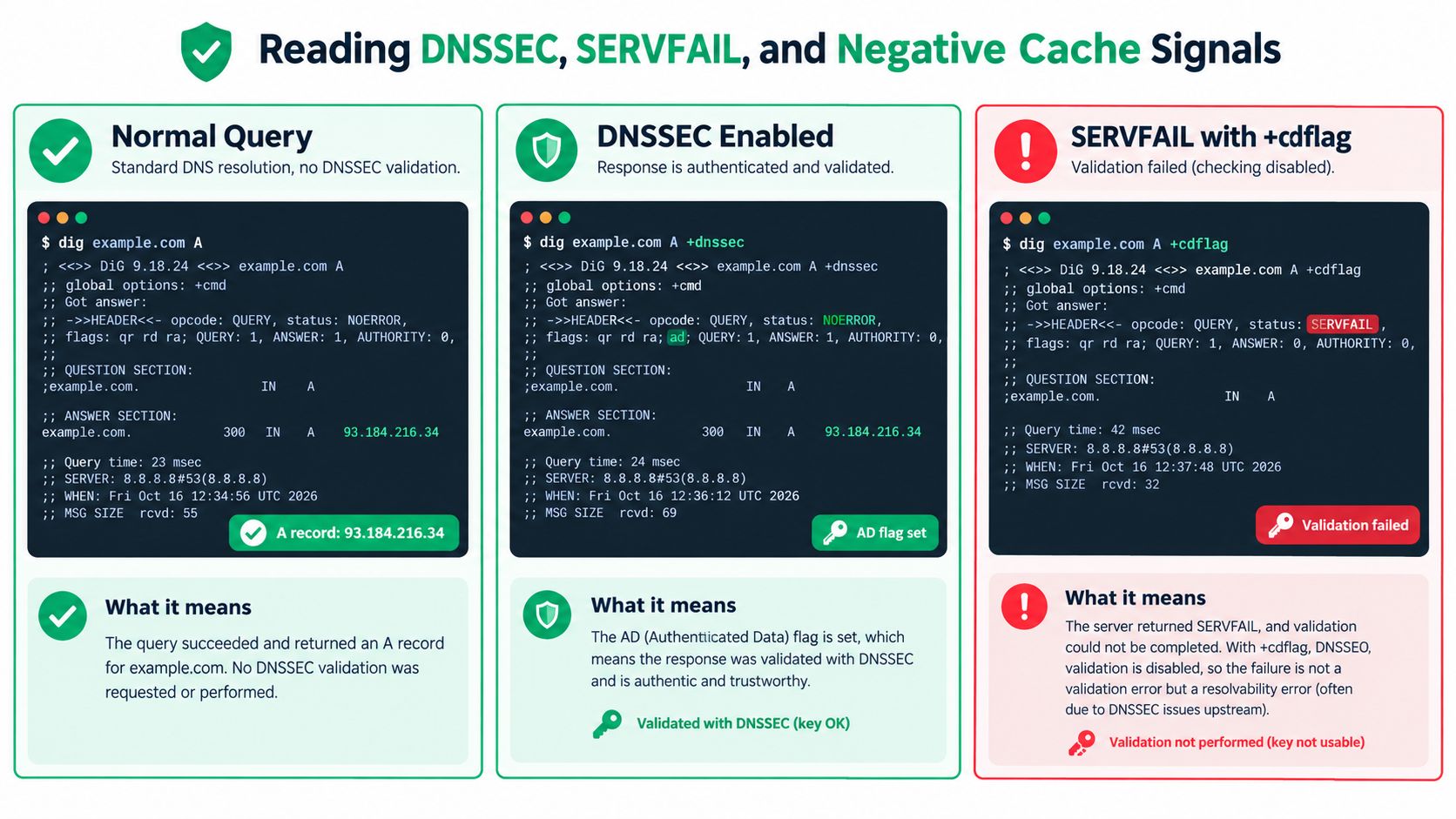
The combination of responses can narrow the fault. If a normal validating query returns SERVFAIL but +cdflag returns an answer, a DNSSEC validation issue is a strong possibility. Investigate a mismatched or stale DS record, expired signature, unsupported algorithm, or an unintended DS record for an unsigned delegation. Preserve both outputs for the incident record.
A measurement by NLnet Labs found that about 26–28% of observed probes showed the DNSSEC AD validation signal, while 88% indicated DNSSEC awareness through the DO bit. The distinction matters: a resolver can signal DNSSEC awareness without showing that it validated the answer (NLnet Labs DNSSEC validation presentation).
Don't conflate these response outcomes:
- NXDOMAIN means the responding DNS server says the name doesn't exist.
- NOERROR with an empty answer means the query succeeded, but the requested record type wasn't returned for that name.
- SERVFAIL means resolution failed. DNSSEC is one possible cause, but check reachability and delegation too.
Negative caching can keep an earlier NXDOMAIN answer visible after a name has been created. RFC 8198 gives 10,800 seconds, or three hours, as the suggested maximum default negative-cache TTL for DNSSEC-validated negative information. The effective negative TTL depends on the smaller of the SOA.MINIMUM value and the SOA record's TTL (RFC 8198 on aggressive use of DNSSEC-validated cache). When a new name appears missing, inspect the SOA and compare the authoritative answer with independent recursive resolvers before changing the zone again.
Troubleshooting Inconsistent Results Across Resolvers
A SaaS team changes an A record and sees the new address in two online checkers. A customer elsewhere reports that the site won't resolve. Capture the customer's resolver result alongside the authoritative answer. Repeating a successful lookup from your own network won't explain their failure.
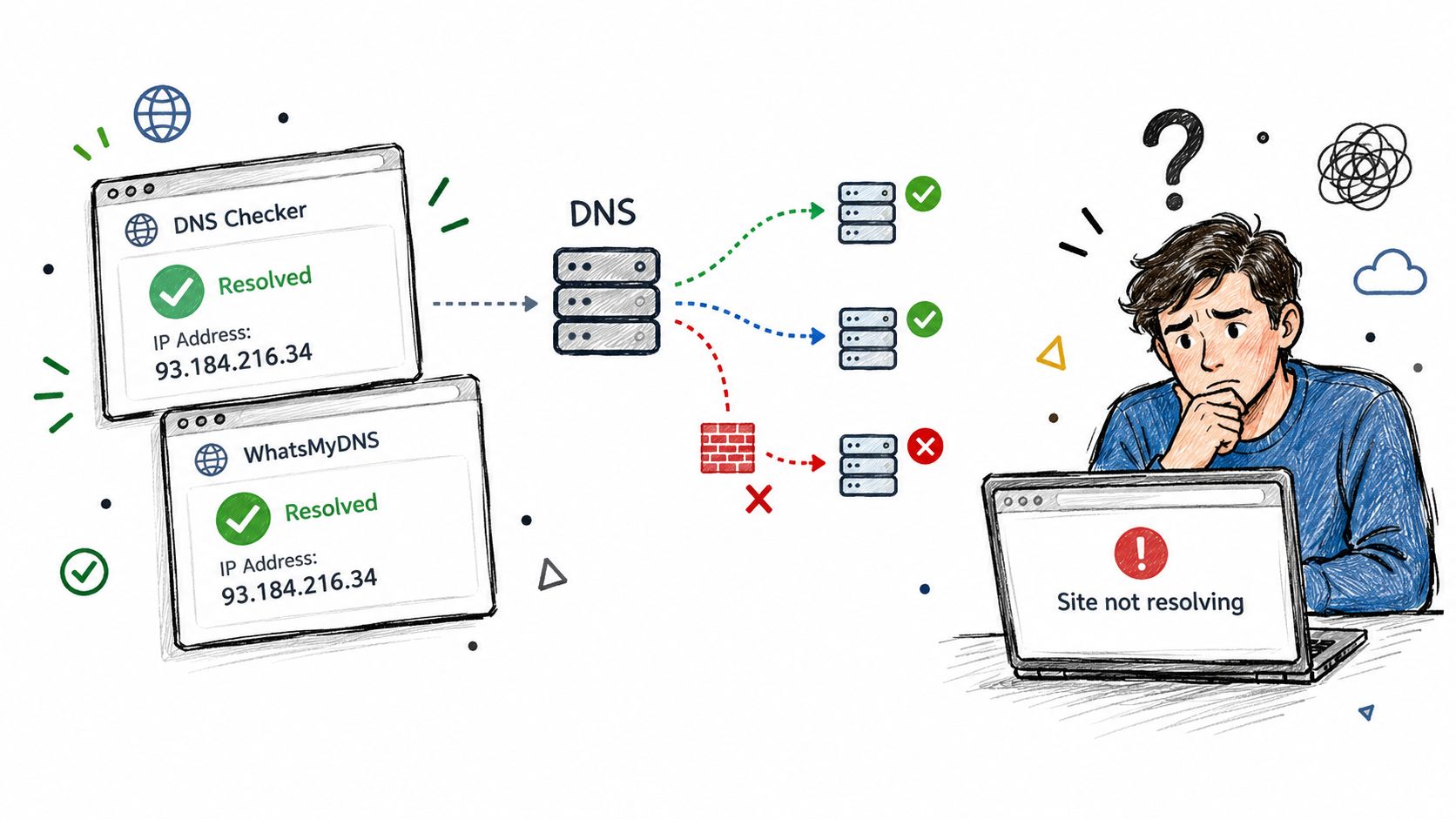
Start with the delegation and query each authoritative nameserver for the same owner name and record type. If they disagree, investigate the zone provider or delegation before treating the mismatch as caching. Otherwise, compare their answer with Google, Cloudflare, Quad9, and an ISP resolver serving the affected customer.
Use dig @resolver-address example.com A to make the resolver choice explicit. Keep the full output so you can compare the response status, answer, and TTL rather than just the address.
An old value with a decreasing TTL supports a cached-answer diagnosis. Repeat the query against the same resolver to observe that countdown, then check again after expiry. A countdown alone doesn't establish that users are unaffected: if the old address no longer serves the site, cached DNS can still cause a real availability problem.
For a newly added subdomain, compare a resolver's NXDOMAIN response with the authoritative result. As noted earlier, negative answers can persist for the SOA-driven negative TTL, so inspect the zone's SOA before editing again. A SERVFAIL response needs a resolution-failure investigation rather than the same waiting strategy.
An old cached answer identifies what that resolver currently returns; the authoritative query establishes what the zone currently publishes.
Keep these traps in view:
- Checking one resolver only: Public checkers may succeed while the customer's ISP resolver still returns a conflicting answer.
- Querying the CNAME target: Check the configured owner name as well as its target to locate the mismatch.
- Skipping parent delegation: Correct records on a nameserver don't help users whose queries are delegated elsewhere.
- Calling every mismatch failed propagation: Judge the answer, TTL, and effect on reachability together.
For a regional failure, capture results from that region when possible. The useful incident finding is which resolver returns which answer, and whether that answer prevents access.
A Reliable DNS Checking Workflow You Can Repeat
Use the same sequence during a migration and during an incident. It keeps the evidence tied to the right record, authority, and resolver.
- Choose the record type that matches the symptom, such as A or AAAA for site routing, MX for inbound mail, or TXT for authentication and verification.
- Query the authoritative nameserver directly with
dig @authoritative-nameserver example.com A. Capture the response code, answer, TTL, and authority information. - Check delegation and consistency if authoritative servers disagree or return unexpected data.
- Repeat through independent recursive resolvers, including a resolver relevant to the affected network where possible. Log the resolver IP and UTC timestamp for each result.
- Separate response states. Distinguish NXDOMAIN, NOERROR with no matching answer, and SERVFAIL. When DNSSEC is relevant, compare normal and
+cdflagresults and inspect the validation signals.
A DNS check isn't a one-time lookup. It's a comparison between what authoritative servers publish and what recursive resolvers or local caches currently return. Record those views consistently, and a vague propagation complaint becomes a testable question about the zone, delegation, cache, or resolver path.
If you're investigating whether DNS inconsistency is affecting website reachability, SiteAlive - are your website down? offers DNS lookup and DNS propagation tools alongside uptime monitoring and network diagnostics. Use those checks to compare DNS views, then pair them with ongoing availability monitoring to see whether the issue is isolated to a resolver or affecting the service more broadly.
Made with Outrank